Since I stood this blog up ~ten years ago, I’ve been a loyal Mailchimp user - I embedded their signup form in the footer of my site, maintained an audience of subscribed users, and had it automatically send a quick email every time I added a new post.
For years, this was the perfect setup, as I could abstract away all the complexity of sending emails and simply focus on writing new content!
Unfortunately, earlier this year Mailchimp made the choice to “enshittify” their offering by dramatically cutting down the functionality of their free tier to only 250 contacts and 500 email sends per month.
Update regarding changes to Mailchimp Free plan limits
by u/MailchimpSupport in MailChimp
In my book, this was clearly an attempt to leverage platform lock-in to extort current users to pay up for something which used to be free, relying on the fact that many won’t have the know-how to leave. Pissed off by this decision, I decided to leave Mailchimp entirely and build my own newsletter service and then write this post talking it through!
What I Needed
Newsletter services are generally pretty well-established and fungible - here are the core “user stories” I was looking to solve for:
As a reader:
- I would like to sign up for posts to be sent to my email
- I would like the ability to easily unsubscribe if desired
As a writer:
- I would like to automatically email readers for new posts
- I would like to control the look and layout of the emails sent
- I would like to control the timing of the emails sent
- I would like to audit and clean up the list of readers
After poking around other free commercial offerings and seeing limitations on one or more of these dimensions, I decided to roll my own solution backed by a few different AWS services.
What I Built
On the frontend, the difference is pretty much invisible to end users! The signup form is new but similar, and the format and layout of the emails themselves are mostly the same as earlier: a feature image, paragraph of text, and link to the full post.
Most of the differences are happening on the backend. To start, there is now a double opt-in for new subscribers, which should make it harder for bots to sign up. Furthermore, with all of the send logic now maintained in-house, I was able to tune the schedule exactly how I’d like - configuring it to email users the next available morning after a new post lands at 8 AM Eastern / 5 AM Pacific. It skips drafts, only sends emails for new posts, and staggers sends across consecutive mornings if I publish more than once in a day.
How It’s Set Up
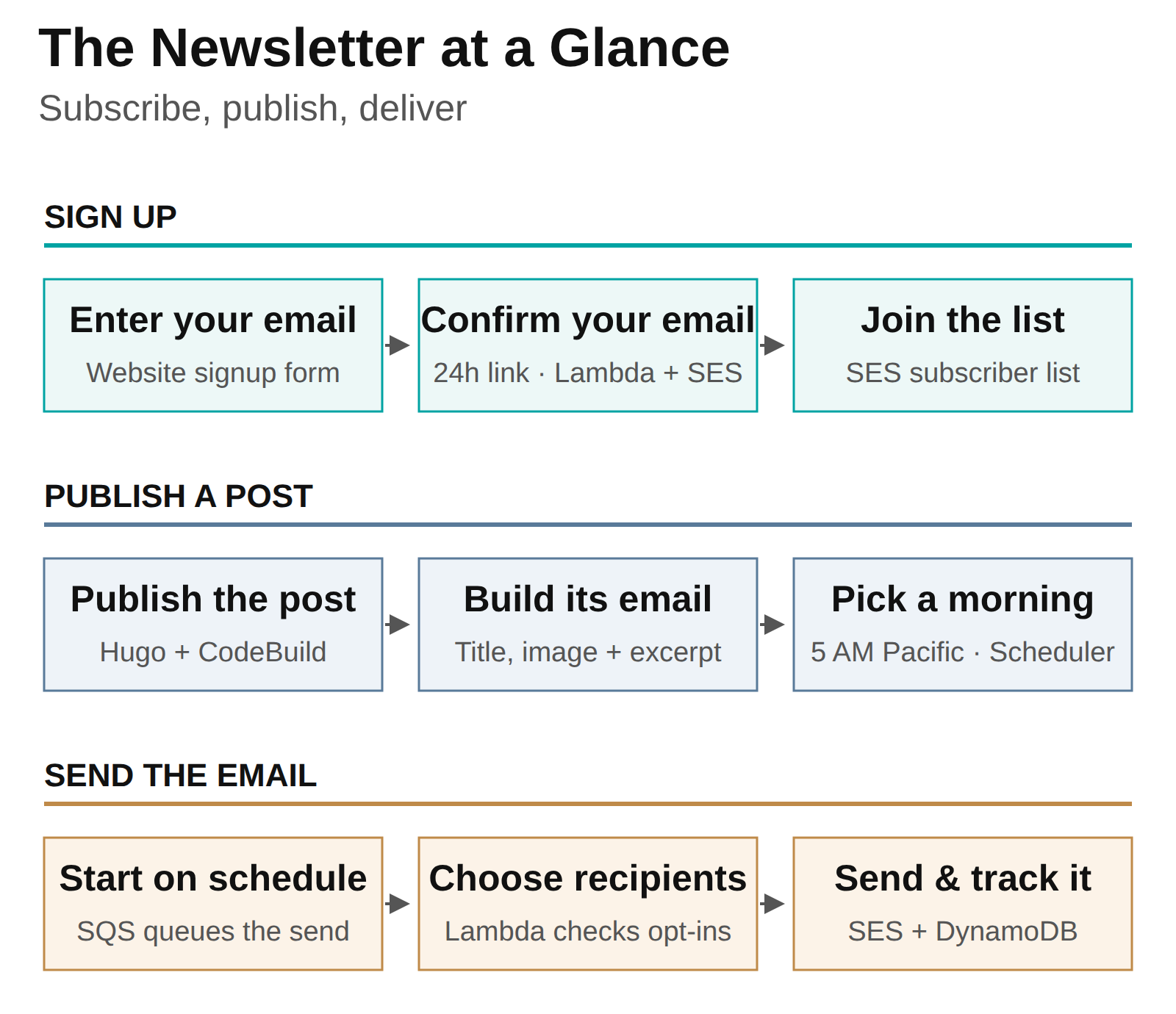
The infrastructure is defined as code (IaaS) in an AWS Serverless Application Model (SAM) template (for clarity + repeatability) and deployed through CloudFormation. The key services I’m using are:
- API Gateway and Lambda handle subscription requests and confirmation links
- DynamoDB stores pending confirmations, campaign content, delivery records, and reserved send times
- Simple Email Service (SES) holds the contact list and sends the messages
- EventBridge Scheduler and SQS trigger scheduled campaigns and hold work that needs another attempt
Here’s how those pieces fit together!
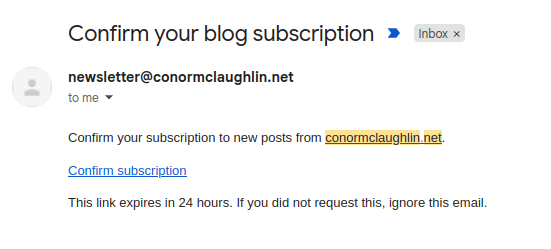
Here’s what that double opt-in I mentioned looks like:
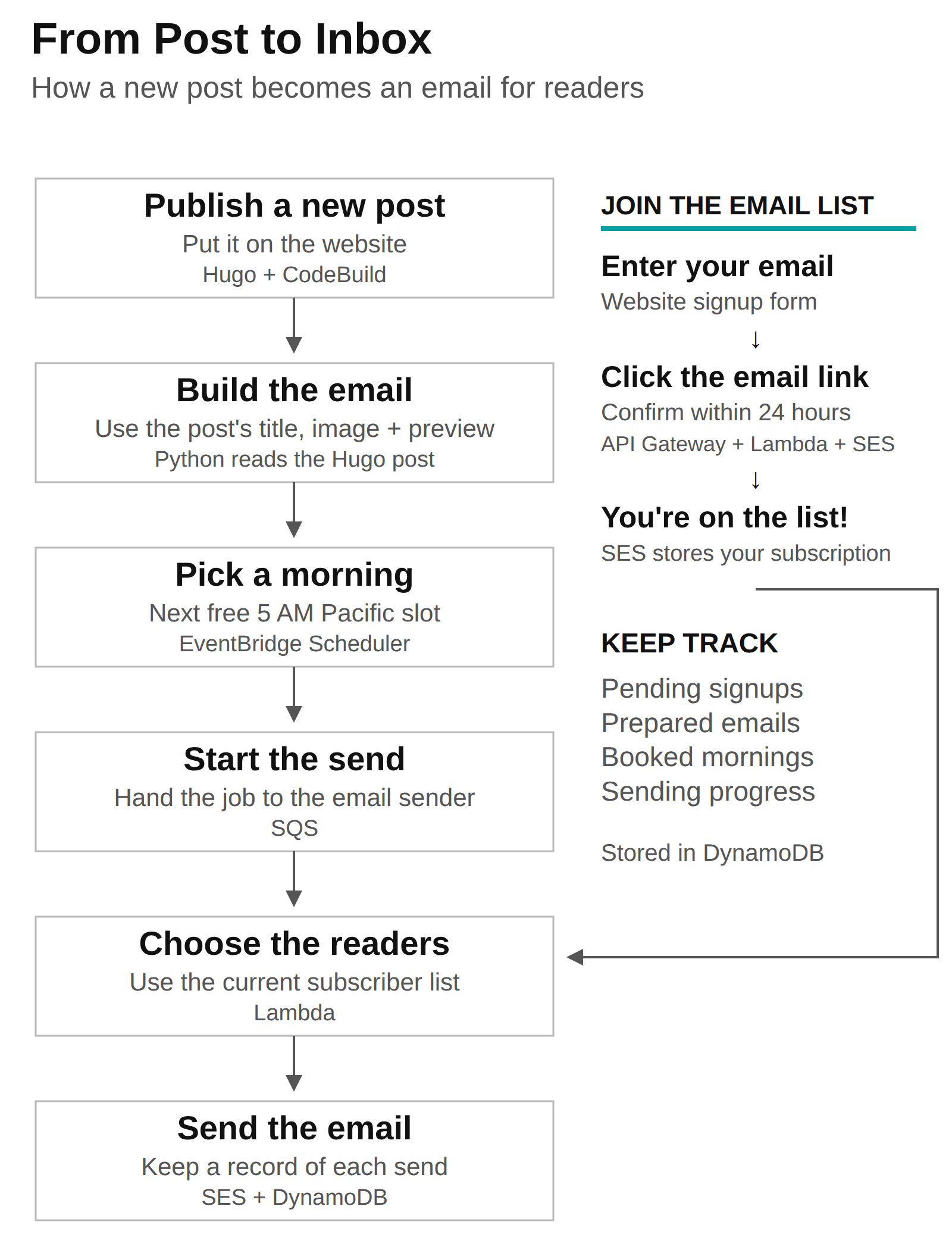
From Post to Inbox
The publishing side is where most of the automation happens. A successful deploy picks up the new post’s title, image, and opening text, then schedules the email for the next available morning. If I make a correction before it goes out, the next deploy updates that same campaign.
Building the Email Automatically
I didn’t want to write the email separately, so the email just borrows the title, image, and opening paragraphs from the post itself. This function pulls those pieces out of the Hugo Markdown file:
def extract_post(path, max_words=120):
    metadata, body = read_hugo_post(path)
    title = str(metadata.get("title", "")).strip()
    if not title:
        raise ValueError("post front matter must contain a title")
    featured_image = str(metadata.get("featuredImage", "")).strip()
    return {
        "title": title,
        "summary": sentence_limited_excerpt(opening_paragraphs(body), max_words),
        "image_url": urljoin(SITE_ORIGIN, featured_image) if featured_image else "",
    }
The helpers strip out Markdown formatting and keep whole sentences, aiming for roughly 120 words. Those pieces then feed the email template - no separate summary to write or image to upload!
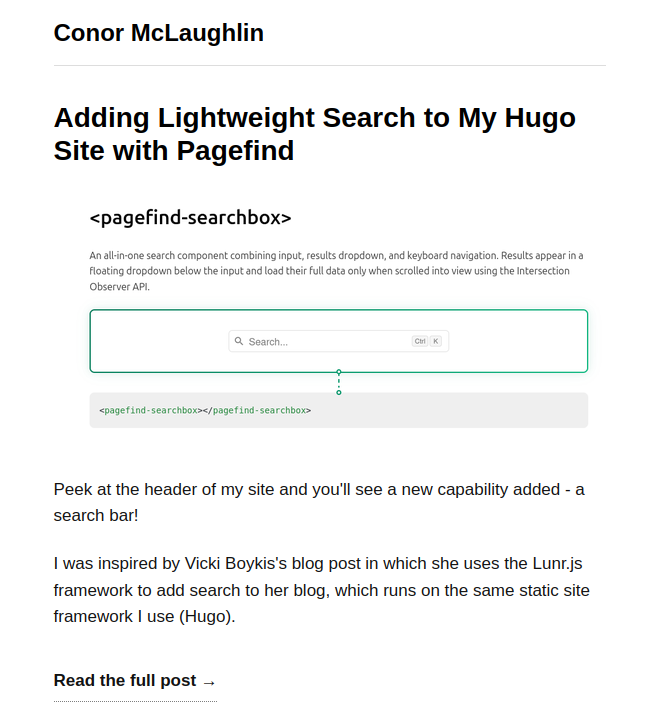
Here’s the email it sent for my recent post on adding search to the site:
What It Costs
At my current pace of roughly two posts a month, this is extremely cheap to run. With SES charging $0.10 per 1,000 emails on its à la carte plan, that’s just $0.20 a month in sending costs for every 1,000 readers. There’s plenty of room to grow, too:
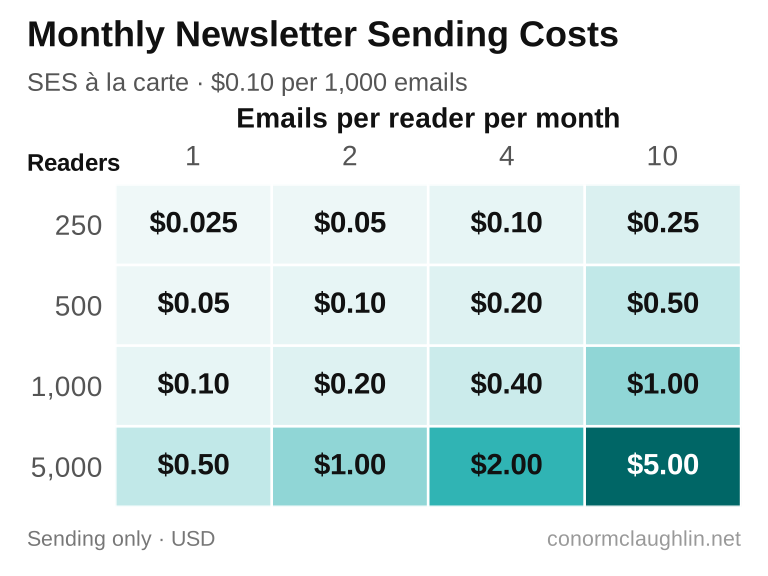
Even if I grew to 5,000 readers and started publishing ten times a month, sending all those newsletters would still cost only $5 a month! The supporting DynamoDB tables, Lambda functions, and monitoring add pretty minimal costs at this scale, so there’s very little overhead to keeping the whole thing running.
In Conclusion
Overall, I’m happy with how this landed! There’s definitely more setup complexity than an off-the-shelf provider, but this way I get to own all the logic and data myself. Plus, the use of SAM for infrastructure-as-code makes it very clear what I’ve built and easy to implement and deploy changes in the future.
The end user experience should be just as good (if not better) than before, and on the writing side, this should continue to be maintenance free - I’ll just publish new posts as usual, and allow these systems to manage the email build + send process.
I would have happily kept using Mailchimp if they hadn’t squeezed the free tier, but to be honest, this was a good excuse for a new project and I’m happy to have learned a few new tools! If you’d like to see it in action, the signup form is at the bottom of the page!